
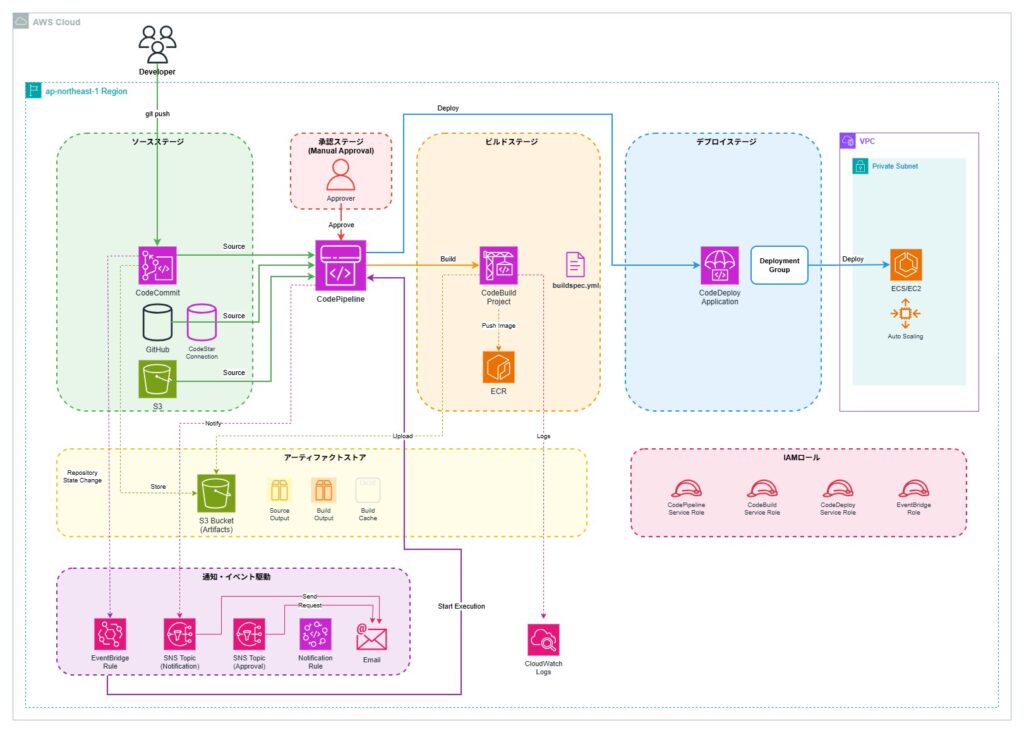
IAMロールの準備
CodePipeline サービスロール
CodePipelineがS3、CodeBuild、CodeDeployなどのAWSサービスにアクセスするために必要なロールです。 パイプライン全体の実行を管理する権限を持ちます。
CodePipelineServiceRole:
  Type: AWS::IAM::Role
  Properties:
    AssumeRolePolicyDocument:
      Statement:
        - Effect: Allow
          Principal:
            Service: codepipeline.amazonaws.com
          Action: sts:AssumeRole
    ManagedPolicyArns:
      - arn:aws:iam::aws:policy/AWSCodePipelineFullAccess
    Policies:
      - PolicyName: CodePipelinePolicy
        PolicyDocument:
          Statement:
            # S3アクセス権限
            - Effect: Allow
              Action:
                - s3:GetObject
                - s3:PutObject
              Resource: !Sub ${ArtifactBucket.Arn}/*
            # CodeBuild実行権限
            - Effect: Allow
              Action:
                - codebuild:BatchGetBuilds
                - codebuild:StartBuild
              Resource: !GetAtt BuildProject.Arn
            # CodeDeploy実行権限
            - Effect: Allow
              Action:
                - codedeploy:CreateDeployment
                - codedeploy:GetDeployment
              Resource: "*"
CodeBuild サービスロール
CodeBuildがビルド処理を実行するために必要なロールです。 CloudWatch Logsへのログ出力、S3へのアクセス、ECRへのイメージプッシュなどの権限を含みます。
CodeBuildServiceRole:
  Type: AWS::IAM::Role
  Properties:
    AssumeRolePolicyDocument:
      Statement:
        - Effect: Allow
          Principal:
            Service: codebuild.amazonaws.com
          Action: sts:AssumeRole
    Policies:
      - PolicyName: CodeBuildPolicy
        PolicyDocument:
          Statement:
            # CloudWatch Logs
            - Effect: Allow
              Action:
                - logs:CreateLogGroup
                - logs:CreateLogStream
                - logs:PutLogEvents
              Resource: "*"
            # S3アクセス
            - Effect: Allow
              Action:
                - s3:GetObject
                - s3:PutObject
              Resource: !Sub ${ArtifactBucket.Arn}/*
            # ECRアクセス(コンテナの場合)
            - Effect: Allow
              Action:
                - ecr:GetAuthorizationToken
                - ecr:BatchCheckLayerAvailability
                - ecr:PutImage
              Resource: "*"
CodeDeploy サービスロール
CodeDeployがEC2インスタンスやその他のコンピューティングリソースにアプリケーションをデプロイするために必要なロールです。
CodeDeployServiceRole:
  Type: AWS::IAM::Role
  Properties:
    AssumeRolePolicyDocument:
      Statement:
        - Effect: Allow
          Principal:
            Service: codedeploy.amazonaws.com
          Action: sts:AssumeRole
    ManagedPolicyArns:
      - arn:aws:iam::aws:policy/AWSCodeDeployRole
アーティファクトバケットの作成
パイプライン内の各ステージ間でビルド成果物やソースコードを受け渡すためのS3バケットです。 バージョニング有効化、暗号化、ライフサイクルポリシーによる自動削除を設定します。
ArtifactBucket:
  Type: AWS::S3::Bucket
  Properties:
    BucketName: !Sub ${AWS::StackName}-artifacts
    VersioningConfiguration:
      Status: Enabled
    BucketEncryption:
      ServerSideEncryptionConfiguration:
        - ServerSideEncryptionByDefault:
            SSEAlgorithm: AES256
    LifecycleConfiguration:
      Rules:
        - Id: DeleteOldArtifacts
          Status: Enabled
          ExpirationInDays: 30
    PublicAccessBlockConfiguration:
      BlockPublicAcls: true
      BlockPublicPolicy: true
      IgnorePublicAcls: true
      RestrictPublicBuckets: true
ソースステージの設定
CodeCommitの場合
AWS CodeCommitリポジトリをソースとして使用する場合の設定です。EventBridgeを使用した自動トリガーが推奨されます。
SourceStage:
  Name: Source
  Actions:
    - Name: SourceAction
      ActionTypeId:
        Category: Source
        Owner: AWS
        Provider: CodeCommit
        Version: 1
      Configuration:
        RepositoryName: my-app-repo
        BranchName: main
        PollForSourceChanges: false  # EventBridge使用推奨
      OutputArtifacts:
        - Name: SourceOutput
GitHubの場合(CodeStarConnection使用)
GitHubリポジトリをソースとして使用する場合の設定です。 CodeStarConnectionを経由してGitHubに安全に接続します。
GitHubConnection:
  Type: AWS::CodeStarConnections::Connection
  Properties:
    ConnectionName: github-connection
    ProviderType: GitHub

SourceStage:
  Name: Source
  Actions:
    - Name: SourceAction
      ActionTypeId:
        Category: Source
        Owner: AWS
        Provider: CodeStarSourceConnection
        Version: 1
      Configuration:
        ConnectionArn: !Ref GitHubConnection
        FullRepositoryId: username/repository
        BranchName: main
      OutputArtifacts:
        - Name: SourceOutput
S3の場合
S3バケットに保存されたZIPファイルをソースとして使用する場合の設定です。
SourceStage:
  Name: Source
  Actions:
    - Name: SourceAction
      ActionTypeId:
        Category: Source
        Owner: AWS
        Provider: S3
        Version: 1
      Configuration:
        S3Bucket: my-source-bucket
        S3ObjectKey: app.zip
        PollForSourceChanges: false
      OutputArtifacts:
        - Name: SourceOutput
ビルドステージの設定
CodeBuildプロジェクトの作成
ソースコードのビルド、テスト、パッケージングを実行するCodeBuildプロジェクトの定義です。 buildspec.ymlでビルド手順を指定し、環境変数やキャッシュ設定を含めます。
BuildProject:
  Type: AWS::CodeBuild::Project
  Properties:
    Name: my-app-build
    ServiceRole: !GetAtt CodeBuildServiceRole.Arn
    Artifacts:
      Type: CODEPIPELINE
    Environment:
      Type: LINUX_CONTAINER
      ComputeType: BUILD_GENERAL1_SMALL
      Image: aws/codebuild/standard:7.0
      EnvironmentVariables:
        - Name: ENV
          Value: production
    Source:
      Type: CODEPIPELINE
      BuildSpec: buildspec.yml
    Cache:
      Type: S3
      Location: !Sub ${ArtifactBucket}/cache
パイプラインのビルドステージ
CodePipelineのビルドステージ定義です。 SourceStageの出力アーティファクトを入力として受け取り、BuildProjectでビルドを実行します。
BuildStage:
  Name: Build
  Actions:
    - Name: BuildAction
      ActionTypeId:
        Category: Build
        Owner: AWS
        Provider: CodeBuild
        Version: 1
      Configuration:
        ProjectName: !Ref BuildProject
      InputArtifacts:
        - Name: SourceOutput
      OutputArtifacts:
        - Name: BuildOutput
デプロイステージの設定
CodeDeployアプリケーションの作成
デプロイ先のコンピューティングプラットフォーム(Server/Lambda/ECS)とデプロイグループを定義します。 デプロイ設定やオートスケーリンググループとの連携を指定します。
DeployApplication:
  Type: AWS::CodeDeploy::Application
  Properties:
    ApplicationName: my-app
    ComputePlatform: Server  # Server, Lambda, ECS

DeploymentGroup:
  Type: AWS::CodeDeploy::DeploymentGroup
  Properties:
    ApplicationName: !Ref DeployApplication
    DeploymentGroupName: production
    ServiceRoleArn: !GetAtt CodeDeployServiceRole.Arn
    DeploymentConfigName: CodeDeployDefault.OneAtATime
    AutoScalingGroups:
      - !Ref AppAutoScalingGroup
パイプラインのデプロイステージ
CodePipelineのデプロイステージ定義です。 ビルドステージの出力アーティファクトをCodeDeployを使用してデプロイします。
DeployStage:
  Name: Deploy
  Actions:
    - Name: DeployAction
      ActionTypeId:
        Category: Deploy
        Owner: AWS
        Provider: CodeDeploy
        Version: 1
      Configuration:
        ApplicationName: !Ref DeployApplication
        DeploymentGroupName: !Ref DeploymentGroup
      InputArtifacts:
        - Name: BuildOutput
パイプラインの作成
Source、Build、Deployの各ステージを統合したCodePipelineの定義です。 アーティファクトストアとしてS3バケットを指定します。
Pipeline:
  Type: AWS::CodePipeline::Pipeline
  Properties:
    Name: my-app-pipeline
    RoleArn: !GetAtt CodePipelineServiceRole.Arn
    ArtifactStore:
      Type: S3
      Location: !Ref ArtifactBucket
    Stages:
      - !Ref SourceStage
      - !Ref BuildStage
      - !Ref DeployStage
イベント駆動の設定(自動トリガー)
EventBridgeルール(CodeCommit)
CodeCommitリポジトリへのプッシュを検知してパイプラインを自動実行するEventBridgeルールです。 特定のブランチへの変更をトリガーとして設定できます。
PipelineTriggerRule:
  Type: AWS::Events::Rule
  Properties:
    EventPattern:
      source:
        - aws.codecommit
      detail-type:
        - CodeCommit Repository State Change
      detail:
        event:
          - referenceCreated
          - referenceUpdated
        referenceType:
          - branch
        referenceName:
          - main
    Targets:
      - Arn: !Sub arn:aws:codepipeline:${AWS::Region}:${AWS::AccountId}:${Pipeline}
        RoleArn: !GetAtt EventBridgeRole.Arn
        Id: codepipeline-trigger
通知の設定
SNSトピックの作成
パイプラインの実行結果や承認リクエストを通知するためのSNSトピックです。 成功、失敗、開始などのイベントをメールで受信できます。
PipelineNotificationTopic:
  Type: AWS::SNS::Topic
  Properties:
    DisplayName: Pipeline Notifications
    Subscription:
      - Endpoint: team@example.com
        Protocol: email

PipelineNotificationRule:
  Type: AWS::CodeStarNotifications::NotificationRule
  Properties:
    Name: pipeline-notifications
    Resource: !Sub arn:aws:codepipeline:${AWS::Region}:${AWS::AccountId}:${Pipeline}
    DetailType: FULL
    EventTypeIds:
      - codepipeline-pipeline-pipeline-execution-failed
      - codepipeline-pipeline-pipeline-execution-succeeded
    Targets:
      - TargetType: SNS
        TargetAddress: !Ref PipelineNotificationTopic
構築の確認とテスト
パイプラインの手動実行
aws codepipeline start-pipeline-execution \
  --name my-app-pipeline
実行状態の確認
aws codepipeline get-pipeline-state \
  --name my-app-pipeline
ログの確認
- CodeBuild: CloudWatch Logs
- CodeDeploy: デプロイログ
- CodePipeline: 実行履歴
パイプライン構築のテンプレート例
CloudFormationテンプレート
Source、Build、Deploy、承認ステージを含む完全なCI/CDパイプラインのCloudFormationテンプレートです。 IAMロール、S3バケット、SNS通知、EventBridgeトリガーなど必要なリソースを一括で作成します。
AWSTemplateFormatVersion: '2010-09-09'
Description: 'Complete CI/CD Pipeline with CodePipeline, CodeBuild, and CodeDeploy'

Parameters:
  RepositoryName:
    Type: String
    Default: my-app-repo
    Description: CodeCommit repository name

  BranchName:
    Type: String
    Default: main
    Description: Branch name to trigger pipeline

  ApplicationName:
    Type: String
    Default: my-app
    Description: Application name

  NotificationEmail:
    Type: String
    Description: Email address for pipeline notifications
    Default: team@example.com

Resources:
  # ========================================
  # S3 Bucket for Artifacts
  # ========================================
  ArtifactBucket:
    Type: AWS::S3::Bucket
    Properties:
      BucketName: !Sub ${AWS::StackName}-artifacts-${AWS::AccountId}
      VersioningConfiguration:
        Status: Enabled
      BucketEncryption:
        ServerSideEncryptionConfiguration:
          - ServerSideEncryptionByDefault:
              SSEAlgorithm: AES256
      LifecycleConfiguration:
        Rules:
          - Id: DeleteOldArtifacts
            Status: Enabled
            ExpirationInDays: 30
      PublicAccessBlockConfiguration:
        BlockPublicAcls: true
        BlockPublicPolicy: true
        IgnorePublicAcls: true
        RestrictPublicBuckets: true
      Tags:
        - Key: Name
          Value: !Sub ${AWS::StackName}-artifacts

  # ========================================
  # SNS Topic for Notifications
  # ========================================
  PipelineNotificationTopic:
    Type: AWS::SNS::Topic
    Properties:
      TopicName: !Sub ${AWS::StackName}-notifications
      DisplayName: Pipeline Notifications
      Subscription:
        - Endpoint: !Ref NotificationEmail
          Protocol: email

  ApprovalNotificationTopic:
    Type: AWS::SNS::Topic
    Properties:
      TopicName: !Sub ${AWS::StackName}-approvals
      DisplayName: Pipeline Approval Requests
      Subscription:
        - Endpoint: !Ref NotificationEmail
          Protocol: email

  # ========================================
  # IAM Role for CodePipeline
  # ========================================
  CodePipelineServiceRole:
    Type: AWS::IAM::Role
    Properties:
      RoleName: !Sub ${AWS::StackName}-CodePipelineRole
      AssumeRolePolicyDocument:
        Version: '2012-10-17'
        Statement:
          - Effect: Allow
            Principal:
              Service: codepipeline.amazonaws.com
            Action: sts:AssumeRole
      ManagedPolicyArns:
        - arn:aws:iam::aws:policy/AWSCodePipelineFullAccess
      Policies:
        - PolicyName: CodePipelinePolicy
          PolicyDocument:
            Version: '2012-10-17'
            Statement:
              # S3 Access
              - Effect: Allow
                Action:
                  - s3:GetObject
                  - s3:GetObjectVersion
                  - s3:PutObject
                  - s3:GetBucketLocation
                  - s3:ListBucket
                Resource:
                  - !GetAtt ArtifactBucket.Arn
                  - !Sub ${ArtifactBucket.Arn}/*

              # CodeCommit Access
              - Effect: Allow
                Action:
                  - codecommit:GetBranch
                  - codecommit:GetCommit
                  - codecommit:UploadArchive
                  - codecommit:GetUploadArchiveStatus
                  - codecommit:CancelUploadArchive
                Resource: !Sub arn:aws:codecommit:${AWS::Region}:${AWS::AccountId}:${RepositoryName}

              # CodeBuild Access
              - Effect: Allow
                Action:
                  - codebuild:BatchGetBuilds
                  - codebuild:StartBuild
                Resource: !GetAtt BuildProject.Arn

              # CodeDeploy Access
              - Effect: Allow
                Action:
                  - codedeploy:CreateDeployment
                  - codedeploy:GetApplication
                  - codedeploy:GetApplicationRevision
                  - codedeploy:GetDeployment
                  - codedeploy:GetDeploymentConfig
                  - codedeploy:RegisterApplicationRevision
                Resource: '*'

              # SNS Access
              - Effect: Allow
                Action:
                  - sns:Publish
                Resource:
                  - !Ref ApprovalNotificationTopic

  # ========================================
  # IAM Role for CodeBuild
  # ========================================
  CodeBuildServiceRole:
    Type: AWS::IAM::Role
    Properties:
      RoleName: !Sub ${AWS::StackName}-CodeBuildRole
      AssumeRolePolicyDocument:
        Version: '2012-10-17'
        Statement:
          - Effect: Allow
            Principal:
              Service: codebuild.amazonaws.com
            Action: sts:AssumeRole
      Policies:
        - PolicyName: CodeBuildPolicy
          PolicyDocument:
            Version: '2012-10-17'
            Statement:
              # CloudWatch Logs
              - Effect: Allow
                Action:
                  - logs:CreateLogGroup
                  - logs:CreateLogStream
                  - logs:PutLogEvents
                Resource:
                  - !Sub arn:aws:logs:${AWS::Region}:${AWS::AccountId}:log-group:/aws/codebuild/*

              # S3 Access
              - Effect: Allow
                Action:
                  - s3:GetObject
                  - s3:GetObjectVersion
                  - s3:PutObject
                Resource:
                  - !Sub ${ArtifactBucket.Arn}/*

              # ECR Access (if using containers)
              - Effect: Allow
                Action:
                  - ecr:GetAuthorizationToken
                  - ecr:BatchCheckLayerAvailability
                  - ecr:GetDownloadUrlForLayer
                  - ecr:BatchGetImage
                  - ecr:PutImage
                  - ecr:InitiateLayerUpload
                  - ecr:UploadLayerPart
                  - ecr:CompleteLayerUpload
                Resource: '*'

              # SSM Parameter Store Access
              - Effect: Allow
                Action:
                  - ssm:GetParameters
                  - ssm:GetParameter
                Resource: !Sub arn:aws:ssm:${AWS::Region}:${AWS::AccountId}:parameter/*

              # Secrets Manager Access
              - Effect: Allow
                Action:
                  - secretsmanager:GetSecretValue
                Resource: !Sub arn:aws:secretsmanager:${AWS::Region}:${AWS::AccountId}:secret:*

  # ========================================
  # IAM Role for CodeDeploy
  # ========================================
  CodeDeployServiceRole:
    Type: AWS::IAM::Role
    Properties:
      RoleName: !Sub ${AWS::StackName}-CodeDeployRole
      AssumeRolePolicyDocument:
        Version: '2012-10-17'
        Statement:
          - Effect: Allow
            Principal:
              Service: codedeploy.amazonaws.com
            Action: sts:AssumeRole
      ManagedPolicyArns:
        - arn:aws:iam::aws:policy/AWSCodeDeployRole

  # ========================================
  # IAM Role for EventBridge
  # ========================================
  EventBridgeRole:
    Type: AWS::IAM::Role
    Properties:
      RoleName: !Sub ${AWS::StackName}-EventBridgeRole
      AssumeRolePolicyDocument:
        Version: '2012-10-17'
        Statement:
          - Effect: Allow
            Principal:
              Service: events.amazonaws.com
            Action: sts:AssumeRole
      Policies:
        - PolicyName: EventBridgePolicy
          PolicyDocument:
            Version: '2012-10-17'
            Statement:
              - Effect: Allow
                Action:
                  - codepipeline:StartPipelineExecution
                Resource: !Sub arn:aws:codepipeline:${AWS::Region}:${AWS::AccountId}:${Pipeline}

  # ========================================
  # CodeBuild Project
  # ========================================
  BuildProject:
    Type: AWS::CodeBuild::Project
    Properties:
      Name: !Sub ${AWS::StackName}-build
      Description: Build project for the application
      ServiceRole: !GetAtt CodeBuildServiceRole.Arn
      Artifacts:
        Type: CODEPIPELINE
      Environment:
        Type: LINUX_CONTAINER
        ComputeType: BUILD_GENERAL1_SMALL
        Image: aws/codebuild/standard:7.0
        PrivilegedMode: true  # Required for Docker
        EnvironmentVariables:
          - Name: AWS_DEFAULT_REGION
            Value: !Ref AWS::Region
          - Name: AWS_ACCOUNT_ID
            Value: !Ref AWS::AccountId
          - Name: APPLICATION_NAME
            Value: !Ref ApplicationName
      Source:
        Type: CODEPIPELINE
        BuildSpec: |
          version: 0.2
          phases:
            install:
              runtime-versions:
                nodejs: 18
              commands:
                - echo "Installing dependencies..."
                - npm install

            pre_build:
              commands:
                - echo "Running tests and linting..."
                - npm run lint
                - npm test
                - echo "Logged in to ECR..."

            build:
              commands:
                - echo "Building application..."
                - npm run build
                - echo "Build completed on $(date)"

            post_build:
              commands:
                - echo "Creating deployment package..."
                - zip -r deployment.zip . -x "*.git*" "node_modules/*" "tests/*"

          artifacts:
            files:
              - '**/*'
            base-directory: .

          cache:
            paths:
              - 'node_modules/**/*'
      Cache:
        Type: S3
        Location: !Sub ${ArtifactBucket}/build-cache
      LogsConfig:
        CloudWatchLogs:
          Status: ENABLED
          GroupName: !Sub /aws/codebuild/${AWS::StackName}-build
      Tags:
        - Key: Name
          Value: !Sub ${AWS::StackName}-build

  # ========================================
  # CodeDeploy Application
  # ========================================
  DeployApplication:
    Type: AWS::CodeDeploy::Application
    Properties:
      ApplicationName: !Ref ApplicationName
      ComputePlatform: Server

  # ========================================
  # CodeDeploy Deployment Group
  # ========================================
  DeploymentGroup:
    Type: AWS::CodeDeploy::DeploymentGroup
    Properties:
      ApplicationName: !Ref DeployApplication
      DeploymentGroupName: !Sub ${ApplicationName}-deployment-group
      ServiceRoleArn: !GetAtt CodeDeployServiceRole.Arn
      DeploymentConfigName: CodeDeployDefault.OneAtATime
      DeploymentStyle:
        DeploymentType: IN_PLACE
        DeploymentOption: WITHOUT_TRAFFIC_CONTROL
      Ec2TagFilters:
        - Type: KEY_AND_VALUE
          Key: Environment
          Value: production
      AutoRollbackConfiguration:
        Enabled: true
        Events:
          - DEPLOYMENT_FAILURE
          - DEPLOYMENT_STOP_ON_ALARM

  # ========================================
  # CodePipeline
  # ========================================
  Pipeline:
    Type: AWS::CodePipeline::Pipeline
    Properties:
      Name: !Sub ${AWS::StackName}-pipeline
      RoleArn: !GetAtt CodePipelineServiceRole.Arn
      ArtifactStore:
        Type: S3
        Location: !Ref ArtifactBucket
      Stages:
        # Source Stage
        - Name: Source
          Actions:
            - Name: SourceAction
              ActionTypeId:
                Category: Source
                Owner: AWS
                Provider: CodeCommit
                Version: 1
              Configuration:
                RepositoryName: !Ref RepositoryName
                BranchName: !Ref BranchName
                PollForSourceChanges: false
              OutputArtifacts:
                - Name: SourceOutput
              RunOrder: 1

        # Build Stage
        - Name: Build
          Actions:
            - Name: BuildAction
              ActionTypeId:
                Category: Build
                Owner: AWS
                Provider: CodeBuild
                Version: 1
              Configuration:
                ProjectName: !Ref BuildProject
              InputArtifacts:
                - Name: SourceOutput
              OutputArtifacts:
                - Name: BuildOutput
              RunOrder: 1

        # Deploy to Dev Stage
        - Name: DeployToDev
          Actions:
            - Name: DeployAction
              ActionTypeId:
                Category: Deploy
                Owner: AWS
                Provider: CodeDeploy
                Version: 1
              Configuration:
                ApplicationName: !Ref DeployApplication
                DeploymentGroupName: !Ref DeploymentGroup
              InputArtifacts:
                - Name: BuildOutput
              RunOrder: 1

        # Manual Approval Stage
        - Name: ApprovalForProduction
          Actions:
            - Name: ManualApproval
              ActionTypeId:
                Category: Approval
                Owner: AWS
                Provider: Manual
                Version: 1
              Configuration:
                CustomData: !Sub |
                  本番環境へのデプロイを承認してください。

                  アプリケーション: ${ApplicationName}
                  ブランチ: ${BranchName}

                  デプロイ前に以下を確認してください:
                  - 開発環境でのテスト完了
                  - リリースノートの確認
                  - ロールバック手順の確認
                NotificationArn: !Ref ApprovalNotificationTopic
              RunOrder: 1

        # Deploy to Production Stage
        - Name: DeployToProduction
          Actions:
            - Name: DeployAction
              ActionTypeId:
                Category: Deploy
                Owner: AWS
                Provider: CodeDeploy
                Version: 1
              Configuration:
                ApplicationName: !Ref DeployApplication
                DeploymentGroupName: !Ref DeploymentGroup
              InputArtifacts:
                - Name: BuildOutput
              RunOrder: 1
      Tags:
        - Key: Name
          Value: !Sub ${AWS::StackName}-pipeline

  # ========================================
  # EventBridge Rule for Auto Trigger
  # ========================================
  PipelineTriggerRule:
    Type: AWS::Events::Rule
    Properties:
      Name: !Sub ${AWS::StackName}-trigger
      Description: Trigger pipeline on code commit
      EventPattern:
        source:
          - aws.codecommit
        detail-type:
          - CodeCommit Repository State Change
        detail:
          event:
            - referenceCreated
            - referenceUpdated
          referenceType:
            - branch
          referenceName:
            - !Ref BranchName
        resources:
          - !Sub arn:aws:codecommit:${AWS::Region}:${AWS::AccountId}:${RepositoryName}
      State: ENABLED
      Targets:
        - Arn: !Sub arn:aws:codepipeline:${AWS::Region}:${AWS::AccountId}:${Pipeline}
          RoleArn: !GetAtt EventBridgeRole.Arn
          Id: !Sub ${AWS::StackName}-pipeline-target

  # ========================================
  # CodeStar Notification Rule
  # ========================================
  PipelineNotificationRule:
    Type: AWS::CodeStarNotifications::NotificationRule
    Properties:
      Name: !Sub ${AWS::StackName}-notifications
      DetailType: FULL
      Resource: !Sub arn:aws:codepipeline:${AWS::Region}:${AWS::AccountId}:${Pipeline}
      EventTypeIds:
        - codepipeline-pipeline-pipeline-execution-failed
        - codepipeline-pipeline-pipeline-execution-succeeded
        - codepipeline-pipeline-pipeline-execution-started
        - codepipeline-pipeline-stage-execution-failed
      Targets:
        - TargetType: SNS
          TargetAddress: !Ref PipelineNotificationTopic
      Status: ENABLED

# ========================================
# Outputs
# ========================================
Outputs:
  PipelineName:
    Description: CodePipeline Name
    Value: !Ref Pipeline
    Export:
      Name: !Sub ${AWS::StackName}-PipelineName

  PipelineUrl:
    Description: CodePipeline URL
    Value: !Sub https://console.aws.amazon.com/codesuite/codepipeline/pipelines/${Pipeline}/view?region=${AWS::Region}

  ArtifactBucketName:
    Description: S3 Bucket for Artifacts
    Value: !Ref ArtifactBucket
    Export:
      Name: !Sub ${AWS::StackName}-ArtifactBucket

  BuildProjectName:
    Description: CodeBuild Project Name
    Value: !Ref BuildProject
    Export:
      Name: !Sub ${AWS::StackName}-BuildProject

  DeployApplicationName:
    Description: CodeDeploy Application Name
    Value: !Ref DeployApplication
    Export:
      Name: !Sub ${AWS::StackName}-DeployApplication

  NotificationTopicArn:
    Description: SNS Topic for Notifications
    Value: !Ref PipelineNotificationTopic
    Export:
      Name: !Sub ${AWS::StackName}-NotificationTopic
デプロイ方法
CloudFormationテンプレートを使用してCI/CDパイプラインをデプロイするCLIコマンドです。 パラメータでリポジトリ名、ブランチ名、通知先メールアドレスなどを指定します。
# CloudFormationスタックの作成
aws cloudformation create-stack \
  --stack-name my-cicd-pipeline \
  --template-body file://pipeline.yaml \
  --parameters \
    ParameterKey=RepositoryName,ParameterValue=my-app-repo \
    ParameterKey=BranchName,ParameterValue=main \
    ParameterKey=ApplicationName,ParameterValue=my-app \
    ParameterKey=NotificationEmail,ParameterValue=team@example.com \
  --capabilities CAPABILITY_NAMED_IAM \
  --region ap-northeast-1

# スタックの状態確認
aws cloudformation describe-stacks \
  --stack-name my-cicd-pipeline \
  --query 'Stacks[0].StackStatus'

# パイプラインの手動実行
aws codepipeline start-pipeline-execution \
  --name my-cicd-pipeline-pipeline